
EZ Tweaker
Pixnub EZ Composites Composite Adjuster
Why rerun a huge completed EZ Composites when all you need to do is a small adjust to font and image stroke? Now there’s EZ Tweaker.
What it does:
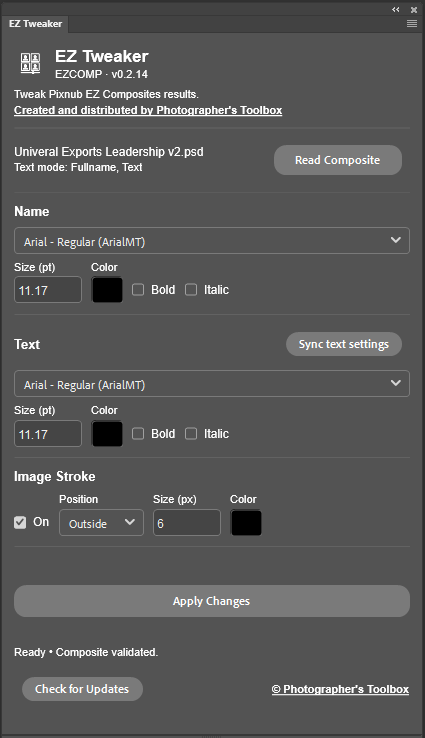
EZ Tweaker analyzes an existing EZ Composites layered composite file to let you “tweak” settings for text and image stroke without having to regenerate the whole composite. Need an smaller inside stroke instead of an regular size outside stroke? Want to change font type, size or color? EZ Tweaker does that faster than re-running the composite creation and does not change the image or text contents.
Helpful features:
The Plug-in checks to ensure the composite is a Pixnub EZ Composite generated composite
Text and image that are not part of the EZ Composite image matrix are not affected.
Manual changes to text contents to adjust spelling or word-wrap are not affected.
“Check for Updates” opens a version check website to ensure you can download the current version.
How to use the plug-in:
Open any completed EZ Composites composite file (template or Layout Designer).
Press “Read Composite” button. EZ Tweaker analyzes the EZ Composites layered composite file.
Adjust or “tweak” the desired settings for text attributes and image stroke.
Press “Sync text settings” to copy all settings across multiple text lines.
Press “Apply Changes” to update the changed attributes.
EXAMPLE
Change composite text font to Century, font color to blue, font size for first text line becomes 12 pt and second line becomes 9 pt
Change composite image stroke to matching blue, inside, 6 pt stroke.

BEFORE

AFTER
Installation
The plug-in is a regular Adobe Creative Cloud CCX plug-in. Download the plug-in to a folder where you store you other CCX files and then double click on the CCX file. This will install the plug-in to Adobe Creative Cloud on that computer and make it available to Photoshop. Since this is a manually installed plug-in, you will need repeat the installation on any other computers where you have Photoshop installed.
FAQ
Q: How much does this handy tool cost?
A: There is no charge for this tool. You may not disassemble it or modify it. You may not re-sell it. Use it to make yourself a more efficient volume photographer.
Q: The plug-in tool does not run.
A: Contact support at hello@PhotographgersToolbox.com for assistance with resolving the issue.